


TYPES OF NETWORKS
Types of networks are distinguished based on their size (in terms of the number of machines), their data transfer speed, and their reach. Private networks are networks that belong to a single organisation. There are usually said to be four categories of networks:
Types of networks are distinguished based on their size (in terms of the number of machines), their data transfer speed, and their reach. Private networks are networks that belong to a single organisation. There are usually said to be four categories of networks:
- LAN (local area network)
- WLAN (wireless local area network)
- MAN (metropolitan area network)
- WAN (wide area network)
- VPN (Virtual Private network)
There are two other types of networks: TANs (Tiny Area Network), which are the same as LANs but smaller (2 to 3 machines), and CANs (Campus Area Networks), which are the same as MANs (with bandwidth limited between each of the network's LANs).
LAN
LAN stands for Local Area Network. It's a group of computers which all belong to the same organisation, and which are linked within a small geographic area using a network, and often the same technology (the most widespread being Ethernet).

By expanding the definition of a LAN to the services that it provides, two different operating modes can be defined:
- In a "peer-to-peer" network, in which communication is carried out from one computer to another, without a central computer, and where each computer has the same role.
- in a "client/server" environment, in which a central computer provides network services to users.
WLAN
WLAN stands for Wireless Local Area Network. provides wireless communication over short distances using radio or infrared signals instead of traditional network cabling. WLANs are built by attaching a device called Access Point (AP) to the edge of the wired network. Clients communicate with the AP using a wireless network adapter similar in function to a traditional ethernet adapter.
MAN

A MAN is made from switches or routers connected to one another with high-speed links (usually fibre optic cables).
WAN
 A WAN (Wide Area Network or extended network) connects multiple LANs to one another over great geographic distances.
The speed available on a WAN varies depending on the cost of the connections (which increases with distance) and may be low.
WANs operate using routers, which can "choose" the most appropriate path for data to take to reach a network node.
The most well-known WAN is the Internet.
VPN
 The term Virtual Private Network (VPN for short) is used to refer to the network artificially created using the Internet as a transmission medium with a tunneling protocol, which means that the data is encapsulated before being sent in an encrypted manner.
 This network is said to be virtual because it links two "physical" networks (local area networks) using an unreliable connection (the Internet), and private because only computers which belong to a local area network on one end of the VPN or the other can "see" the data.
The VPN system, then, can provide a secure connection at a lower cost, as all that is needed is the hardware on either end. On the other hand, it cannot ensure a quality of service comparable to a leased line, as the physical network is public and therefore not guaranteed.
NETWORK HARDWARE
Networking hardware includes all computers, peripherals, interface cards and other equipment needed to perform data-processing and communications within the network
Network Interface Cards
Network interface cards are a major factor in determining the speed and performance of a network. It is a good idea to use the fastest network card available for the type of workstation you are using.The Network Interface Card (NIC) provides the physical connection between the network and the computer workstation. Most NICs are internal, with the card fitting into an expansion slot inside the computer. Some computers, such as Mac Classics, use external boxes which are attached to a serial port or a SCSI port. Laptop computers generally use external LAN adapters connected to the parallel port or network cards that slip into a PCMCIA slot.
The three most common network interface connections are Ethernet cards, LocalTalk connectors, and Token Ring cards.
Ethernet Cards
 Ethernet cards are usually purchased separately from a computer, although many computers (such as the Macintosh) now include an option for a pre-installed Ethernet card. Ethernet cards contain connections for either coaxial or twisted pair cables. If it is designed for coaxial cable, the connection will be BNC. If it is designed for twisted pair, it will have a RJ-45 connection. Some Ethernet cards also contain an AUI connector. This can be used to attach coaxial, twisted pair, or fiber optics cable to an Ethernet card. When this method is used there is always an external transceiver attached to the workstation.
Wireless Network Adapter
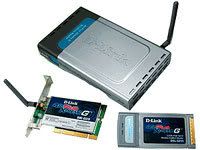
Wireless network adapters also exist in several different form factors. Traditional PCI wireless adapters are add-in cards designed for installation inside a desktop computer having a PCI bus. USB wireless adapters connect to the external USB port of a computer. Finally, so-called PC Card or PCMCIA wireless adapters insert into a narrow open bay on a notebook computer.
 Each type of wireless network adapter is small, generally less than 6 inches (0.15 m) long. Each provides equivalent wireless capability according to the Wi-Fi standard it supports.
Some notebook computers are now manufactured with bulit-in wireless networking. Small chips inside the computer provide the equivalent functions of a network adapter. These computers obviously do not require separate installation of a separate wireless network adapter.
Repeater / hub
 When a signal travels along a cable, it tends to lose strength. A repeater is a device that boosts a network's signal as it passes through. The repeater does this by electrically amplifying the signal it receives and rebroadcasting it. Repeaters can be separate devices or they can be incorporated into a concentration. They are used when the total length of your network cable exceeds the standards set for the type of cable being used. Repeaters require a small amount of time to regenerate the signal. This can cause a propagation delay which can affect network communication when there are several repeaters in a row. Many network architectures limit the number of repeaters that can be used in a row.
Bridge
A bridge monitors the information traffic on both sides of the network so that it can pass packets of information to the correct location. Most bridges can "listen" to the network and automatically figure out the address of each computer on both sides of the bridge. The bridge can inspect each message and, if necessary, broadcast it on the other side of the network.The bridge manages the traffic to maintain optimum performance on both sides of the network. You might say that the bridge is like a traffic cop at a busy intersection during rush hour. It keeps information flowing on both sides of the network, but it does not allow unnecessary traffic through.
 Bridges can be used to connect different types of cabling, or physical topologies. They must, however, be used between networks with the same protocol.A bridge is a device that allows you to segment a large network into two smaller, more efficient networks. If you are adding to an older wiring scheme and want the new network to be up-to-date, a bridge can connect the two.A bridge reads the outermost section of data on the data packet, to tell where the message is going. It reduces the traffic on other network segments, since it does not send all packets. Bridges can be programmed to reject packets from particular networks. Only a special bridge called a translation bridge will allow two networks of different architectures to be connected. Bridges do not normally allow connection of networks with different architectures. The hardware address is also called the MAC (media access control) address. To determine the network segment a MAC address belongs to, bridges use one of:
- Transparent Bridging - They build a table of addresses (bridging table) as they receive packets. If the address is not in the bridging table, the packet is forwarded to all segments other than the one it came from. This type of bridge is used on ethernet networks.
- Source route bridging - The source computer provides path information inside the packet. This is used on Token Ring networks.
Router
A router translates information from one network to another; it is similar to a superintelligent bridge. Routers select the best path to route a message, based on the destination address and origin. The router can direct traffic to prevent head-on collisions, and is smart enough to know when to direct traffic along back roads and shortcuts.
 While bridges know the addresses of all computers on each side of the network, routers know the addresses of computers, bridges, and other routers on the network. Routers can even "listen" to the entire network to determine which sections are busiest -- they can then redirect data around those sections until they clear up.
It also determines the best route to send the data over the Internet. Routers can:
- Direct signal traffic efficiently
- Route messages between any two protocols
- Route messages between linear bus, star, and star-wired ring topologies
- Route messages across fiber optic, coaxial, and twisted-pair cabling
Brouter
There is a device called a brouter which will function similar to a bridge for network transport protocols that are not routable, and will function as a router for routable protocols. It functions at the network and data link layers of the OSI network model.
Gateway
 A gateway can translate information between different network data formats or network architectures. It can translate TCP/IP to AppleTalk so computers supporting TCP/IP can communicate with Apple brand computers. Most gateways operate at the application layer, but can operate at the network or session layer of the OSI model. Gateways will start at the lower level and strip information until it gets to the required level and repackage the information and work its way back toward the hardware layer of the OSI model. To confuse issues, when talking about a router that is used to interface to another network, the word gateway is often used. This does not mean the routing machine is a gateway as defined here, although it could be.
Wireless Access Point

The network hardware discussed in this post performs the functions of transmission, repeating, filtering, routing, etc. between the two communicating devices. The communicating devices have their own specific hardware, software and protocols to communicate through networks. The Server Sytems, Network Operating Systems and Network Protocols would be discussed further in our future posts.


0 comments:
Post a Comment