


 The human brain cell can hold 5 times as much information as the Encyclopedia Britannica. Or any other encyclopedia for that matter.
 Wednesday, 21 September 2011
The human brain cell can hold 5 times as much information as the Encyclopedia Britannica. Or any other encyclopedia for that matter. Monday, 22 August 2011
Samsung has unveiled its new SSD (Solid State Device) 830 Series, which utilizes a SATA Revision 3.0 6 Gbps interface, and is encased in a brushed metal housing. It is aimed at the retail market.
The new arrival in Samsung's SSD lineup will not be as fast as the Optimus SSD that utilizes an SAS interface, or the Micron RealSSD P320h running a PCIe interface, although unlike these devices, the 830 Series will hit the shelves as an upgrade kit.

Recently, Samsung also unveiled its SSD PM830 Series SATA 3-based drives aimed at OEMs, while the 830 Series will be its retail version. According to Samsung, the SSD 830 Series doubles the data bandwidth of the previous 470 Series SSDs. While the company isn't providing detailed figures at this point, the speed is expected not to be lower than the PM830s, which is 500 MB/s reading and 350 MB/s writing. By comparison, the Intel 510 SATA 6 Gbps SSDs deliver up to 500 MB/s reading and 315 MB/s writing speeds.

The Samsung SSD 830 will be sold either as a standalone drive, or as an upgrade kit including a bracket for installing the 2.5'' drive in a 3.5'' bay and required cables for desktop computers, while the notebook upgrade kit includes a USB to SATA adapter cable. Both upgrade kits come with Norton Ghost software. Featuring a brushed metal enclosure, the SSD 830 series will be available in capacities of 64, 128, 256 and 512GB, starting in October.
Thursday, 18 August 2011
The researchers have developed a new nanostructured glass that can funnel data like fiber-optic cables and could be a new type of computer memory.
 A team led by Professor Peter Kazansky at the University’s Optoelectronics Research Centre, used nanostructures to develop new monolithic glass space-variant polarization converters.
Okay, what does that actually mean? Thanks to the millimeter design of these devices, light actually swirls in the glass, creating whirlpools of data that can be read as if they were passing through a fiber-optic cable. Information can be written, wiped and rewritten into the molecular structure of the glass using a laser. The ultra-short laser pulses are used to imprint tiny dots (like 3D pixels) called "voxels" in the glass.
The researchers say that the new device is 20-times smaller and cheaper to the existing methods for microscopy. "Before this we had to use a spatial light modulator based on liquid crystal which cost about £20,000 (roughly $34,750)," said Professor Peter Kazansky in the press release. "Instead we have just put a tiny device into the optical beam and we get the same result."
As of now, these optical memory discs are being used in the medical field for more precise laser material processing, optical manipulation of atom-sized objects, ultra-high resolution imaging and potentially, table-top particle accelerators. The researchers meanwhile are adapted the technology for five-dimensional optical recording, so data can be stored on the glass and last forever. Here’s hoping that it will trickle down to consumer computers one day.
Wednesday, 10 August 2011
TYPES OF NETWORKS
Types of networks are distinguished based on their size (in terms of the number of machines), their data transfer speed, and their reach. Private networks are networks that belong to a single organisation. There are usually said to be four categories of networks:
Types of networks are distinguished based on their size (in terms of the number of machines), their data transfer speed, and their reach. Private networks are networks that belong to a single organisation. There are usually said to be four categories of networks:
- LAN (local area network)
- WLAN (wireless local area network)
- MAN (metropolitan area network)
- WAN (wide area network)
- VPN (Virtual Private network)
There are two other types of networks: TANs (Tiny Area Network), which are the same as LANs but smaller (2 to 3 machines), and CANs (Campus Area Networks), which are the same as MANs (with bandwidth limited between each of the network's LANs).
LAN
LAN stands for Local Area Network. It's a group of computers which all belong to the same organisation, and which are linked within a small geographic area using a network, and often the same technology (the most widespread being Ethernet).

By expanding the definition of a LAN to the services that it provides, two different operating modes can be defined:
- In a "peer-to-peer" network, in which communication is carried out from one computer to another, without a central computer, and where each computer has the same role.
- in a "client/server" environment, in which a central computer provides network services to users.
WLAN
WLAN stands for Wireless Local Area Network. provides wireless communication over short distances using radio or infrared signals instead of traditional network cabling. WLANs are built by attaching a device called Access Point (AP) to the edge of the wired network. Clients communicate with the AP using a wireless network adapter similar in function to a traditional ethernet adapter.
MAN

A MAN is made from switches or routers connected to one another with high-speed links (usually fibre optic cables).
WAN
 A WAN (Wide Area Network or extended network) connects multiple LANs to one another over great geographic distances.
The speed available on a WAN varies depending on the cost of the connections (which increases with distance) and may be low.
WANs operate using routers, which can "choose" the most appropriate path for data to take to reach a network node.
The most well-known WAN is the Internet.
VPN
 The term Virtual Private Network (VPN for short) is used to refer to the network artificially created using the Internet as a transmission medium with a tunneling protocol, which means that the data is encapsulated before being sent in an encrypted manner.
 This network is said to be virtual because it links two "physical" networks (local area networks) using an unreliable connection (the Internet), and private because only computers which belong to a local area network on one end of the VPN or the other can "see" the data.
The VPN system, then, can provide a secure connection at a lower cost, as all that is needed is the hardware on either end. On the other hand, it cannot ensure a quality of service comparable to a leased line, as the physical network is public and therefore not guaranteed.
NETWORK HARDWARE
Networking hardware includes all computers, peripherals, interface cards and other equipment needed to perform data-processing and communications within the network
Network Interface Cards
Network interface cards are a major factor in determining the speed and performance of a network. It is a good idea to use the fastest network card available for the type of workstation you are using.The Network Interface Card (NIC) provides the physical connection between the network and the computer workstation. Most NICs are internal, with the card fitting into an expansion slot inside the computer. Some computers, such as Mac Classics, use external boxes which are attached to a serial port or a SCSI port. Laptop computers generally use external LAN adapters connected to the parallel port or network cards that slip into a PCMCIA slot.
The three most common network interface connections are Ethernet cards, LocalTalk connectors, and Token Ring cards.
Ethernet Cards
 Ethernet cards are usually purchased separately from a computer, although many computers (such as the Macintosh) now include an option for a pre-installed Ethernet card. Ethernet cards contain connections for either coaxial or twisted pair cables. If it is designed for coaxial cable, the connection will be BNC. If it is designed for twisted pair, it will have a RJ-45 connection. Some Ethernet cards also contain an AUI connector. This can be used to attach coaxial, twisted pair, or fiber optics cable to an Ethernet card. When this method is used there is always an external transceiver attached to the workstation.
Wireless Network Adapter
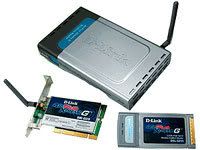
Wireless network adapters also exist in several different form factors. Traditional PCI wireless adapters are add-in cards designed for installation inside a desktop computer having a PCI bus. USB wireless adapters connect to the external USB port of a computer. Finally, so-called PC Card or PCMCIA wireless adapters insert into a narrow open bay on a notebook computer.
 Each type of wireless network adapter is small, generally less than 6 inches (0.15 m) long. Each provides equivalent wireless capability according to the Wi-Fi standard it supports.
Some notebook computers are now manufactured with bulit-in wireless networking. Small chips inside the computer provide the equivalent functions of a network adapter. These computers obviously do not require separate installation of a separate wireless network adapter.
Repeater / hub
 When a signal travels along a cable, it tends to lose strength. A repeater is a device that boosts a network's signal as it passes through. The repeater does this by electrically amplifying the signal it receives and rebroadcasting it. Repeaters can be separate devices or they can be incorporated into a concentration. They are used when the total length of your network cable exceeds the standards set for the type of cable being used. Repeaters require a small amount of time to regenerate the signal. This can cause a propagation delay which can affect network communication when there are several repeaters in a row. Many network architectures limit the number of repeaters that can be used in a row.
Bridge
A bridge monitors the information traffic on both sides of the network so that it can pass packets of information to the correct location. Most bridges can "listen" to the network and automatically figure out the address of each computer on both sides of the bridge. The bridge can inspect each message and, if necessary, broadcast it on the other side of the network.The bridge manages the traffic to maintain optimum performance on both sides of the network. You might say that the bridge is like a traffic cop at a busy intersection during rush hour. It keeps information flowing on both sides of the network, but it does not allow unnecessary traffic through.
 Bridges can be used to connect different types of cabling, or physical topologies. They must, however, be used between networks with the same protocol.A bridge is a device that allows you to segment a large network into two smaller, more efficient networks. If you are adding to an older wiring scheme and want the new network to be up-to-date, a bridge can connect the two.A bridge reads the outermost section of data on the data packet, to tell where the message is going. It reduces the traffic on other network segments, since it does not send all packets. Bridges can be programmed to reject packets from particular networks. Only a special bridge called a translation bridge will allow two networks of different architectures to be connected. Bridges do not normally allow connection of networks with different architectures. The hardware address is also called the MAC (media access control) address. To determine the network segment a MAC address belongs to, bridges use one of:
- Transparent Bridging - They build a table of addresses (bridging table) as they receive packets. If the address is not in the bridging table, the packet is forwarded to all segments other than the one it came from. This type of bridge is used on ethernet networks.
- Source route bridging - The source computer provides path information inside the packet. This is used on Token Ring networks.
Router
A router translates information from one network to another; it is similar to a superintelligent bridge. Routers select the best path to route a message, based on the destination address and origin. The router can direct traffic to prevent head-on collisions, and is smart enough to know when to direct traffic along back roads and shortcuts.
 While bridges know the addresses of all computers on each side of the network, routers know the addresses of computers, bridges, and other routers on the network. Routers can even "listen" to the entire network to determine which sections are busiest -- they can then redirect data around those sections until they clear up.
It also determines the best route to send the data over the Internet. Routers can:
- Direct signal traffic efficiently
- Route messages between any two protocols
- Route messages between linear bus, star, and star-wired ring topologies
- Route messages across fiber optic, coaxial, and twisted-pair cabling
Brouter
There is a device called a brouter which will function similar to a bridge for network transport protocols that are not routable, and will function as a router for routable protocols. It functions at the network and data link layers of the OSI network model.
Gateway
 A gateway can translate information between different network data formats or network architectures. It can translate TCP/IP to AppleTalk so computers supporting TCP/IP can communicate with Apple brand computers. Most gateways operate at the application layer, but can operate at the network or session layer of the OSI model. Gateways will start at the lower level and strip information until it gets to the required level and repackage the information and work its way back toward the hardware layer of the OSI model. To confuse issues, when talking about a router that is used to interface to another network, the word gateway is often used. This does not mean the routing machine is a gateway as defined here, although it could be.
Wireless Access Point

The network hardware discussed in this post performs the functions of transmission, repeating, filtering, routing, etc. between the two communicating devices. The communicating devices have their own specific hardware, software and protocols to communicate through networks. The Server Sytems, Network Operating Systems and Network Protocols would be discussed further in our future posts.
Tuesday, 9 August 2011
Networking is the practice of linking two or more computing devices for the purpose of sharing data which enable more than one user to access shared resources. Whenever you have more than one computer being used at the same location, networking them together makes a lot of sense. Not only can you transfer files between them quickly and easily, but they can also share expensive resources like laser printers, hard disc arrays, backup tape drives, CD and DVD burners, scanners, internet connections and so on.
Network Architectuer
There are two main types of network architectures which are
Server Client
In a server based network, there are computers set up to be primary providers of services such as file service or mail service. The computers providing the service are are called servers and the computers that request and use the service are called client computers.
Peer-to-Peer
In a peer-to-peer network, various computers on the network can act both as clients and servers. For instance, many Microsoft Windows based computers will allow file and print sharing. These computers can act both as a client and a server and are also referred to as peers. Many networks are combination peer-to-peer and server based networks.
The network operating system uses a network data protocol to communicate on the network to other computers. The network operating system supports the applications on that computer. A Network Operating System (NOS) includes Windows Server family, Windows NT, Novell Netware, Linux, Unix and others.
Network Topologies
The network topology describes the method used to do the physical wiring of the network. The main ones are bus, star, and ring.
Bus Topology
Allows information to be directed from one computer to another on a single wire each computer is daisy-chained (connected one right after the other) along the same backbone. Information sent from a node travels along the backbone until it reaches its destination node. Each end of a bus network must be terminated with a terminator. A barrel connector can be used to extend it.

Star Topology
In a star network, each computer is connected to a central device called a hub. The hub takes a signal that comes from any node and passes it along to all the other nodes in the network All devices revolve around a central hub, which is what controls the network communications, and can communicate with other hubs. Range limits are about 100 meters from the hub.

Ring Topology
Similar to a bus network, rings have nodes daisy chained, but the end of the network in a ring topology comes back around to the first node, creating a complete circuit. Each node takes a turn sending and receiving information through the use of a token. The token along with any data is sent from the first node to the second node which extracts the data addressed to it and adds any data it wishes to send. Then second node passes the token and data to the third node, etc. until it comes back around to the first node again. Only the node with the token is allowed to send data . All other nodes must wait for the token to come to them.
Allows information to be directed from one computer to another on a single wire each computer is daisy-chained (connected one right after the other) along the same backbone. Information sent from a node travels along the backbone until it reaches its destination node. Each end of a bus network must be terminated with a terminator. A barrel connector can be used to extend it.

Star Topology
In a star network, each computer is connected to a central device called a hub. The hub takes a signal that comes from any node and passes it along to all the other nodes in the network All devices revolve around a central hub, which is what controls the network communications, and can communicate with other hubs. Range limits are about 100 meters from the hub.

Ring Topology
Similar to a bus network, rings have nodes daisy chained, but the end of the network in a ring topology comes back around to the first node, creating a complete circuit. Each node takes a turn sending and receiving information through the use of a token. The token along with any data is sent from the first node to the second node which extracts the data addressed to it and adds any data it wishes to send. Then second node passes the token and data to the third node, etc. until it comes back around to the first node again. Only the node with the token is allowed to send data . All other nodes must wait for the token to come to them.

Hybrid Topology
There are also hybrid networks including a star-bus hybrid, star-ring network, and mesh networks with
connections between various computers on the network. Mesh networks ideally allow each computer to have a direct connection to each of the other computers. The topology this documentation deals with most is star
topology since that is what ethernet networks use.
Network Media
The two different media for transport of data in the networks are
Wired
Wired networks use either conductive medium or optical medium
The conductive wires transfer data in electrical form of current. The three different types of wires used are
Are electrical cables with an inner conductor surrounded by a flexible, tubular insulating layer, surrounded by a tubular conducting shield. The term coaxial comes from the inner conductor and the outer shield sharing the same geometric axis.
 Although coaxial cabling is difficult to install, it is highly resistant to signal interference. In addition, it can support greater cable lengths between network devices than twisted pair cable. The two types of coaxial
Thin coaxial cable is also referred to as thinnet. 10Base2 refers to the specifications for thin coaxial cable carrying Ethernet signals. The 2 refers to the approximate maximum segment length being 200 meters. In actual fact the maximum segment length is 185 meters. Thin coaxial cable has been popular in
Thick coaxial cable is also referred to as thicknet. 10Base5 refers to the specifications for thick coaxial cable carrying Ethernet signals. The 5 refers to the maximum segment length being 500 meters. Thick coaxial cable has an extra protective plastic cover that helps keep moisture away from the center conductor. This makes thick coaxial a great choice when running longer lengths in a linear bus network.
Unshielded Twisted Pair
 UTP, or Unshielded Twisted Pair, is a type of cable used in telecommunications and computer networks. It consists of different numbers of copper wire that have been twisted into matching pair. It differs from screened and shielded twisted pair, in that the individual pair are not protected with additional protection from interference. Each copper wire is insulated, and the groups of twisted pair have a sheathing holding them together, but no additional insulation is provided.
UTP comes in different types called Categories, often abbreviated as "Cat". The most common are Cat 3, Cat 5e, and Cat 6. The higher the category number, the more twists per foot in the pair, and the better protection from interference. Cat 3 is usually used for home telephone systems. Cat 5e is the industry standard for computer networks and large telephone systems. Cat 6 is an improvement on Cat 5e and is starting to become the favorite for new installs due to its increased speed and protection from interference.
Shielded Twisted Pair
Although UTP cable is the least expensive cable, it may be susceptible to radio and electrical frequency interference (it should not be too close to electric motors, fluorescent lights, etc.). If you must place cable in environments with lots of potential interference, or if you must place cable in extremely sensitive environments that may be susceptible to the electrical current in the UTP, shielded twisted pair may be the solution. Shielded cables can also help to extend the maximum distance of the cables.

Shielded twisted pair cable is available in three different configurations:
Shielded twisted pair cable is available in three different configurations:
- Each pair of wires is individually shielded with foil.
- There is a foil or braid shield inside the jacket covering all wires (as a group).
- There is a shield around each individual pair, as well as around the entire group of wires (referred to as double shield twisted pair).
Fiber Optic Cable
The Optical medium transmits data in the form of packets of light which travel along the length of Fiber Optical Cables from one end of the cable to the other end. The packets of light are tangentially reflected by the inner walls of the fiber cable in form of zig-zag movement.
 Fiber optic cable has the ability to transmit signals over much longer distances than coaxial and twisted pair. It also has the capability to carry information at vastly greater speeds. This capacity broadens communication possibilities to include services such as video conferencing and interactive services. The cost of fiber optic cabling is comparable to copper cabling
The center core of fiber cables is made from glass or plastic fibers A plastic coating then cushions the fiber center, and kevlar fibers help to strengthen the cables and prevent breakage. The outer insulating jacket made of teflon or PVC.
 Fiber optic cable has the ability to transmit signals over much longer distances than coaxial and twisted pair. It also has the capability to carry information at vastly greater speeds. This capacity broadens communication possibilities to include services such as video conferencing and interactive services. The cost of fiber optic cabling is comparable to copper cabling
The center core of fiber cables is made from glass or plastic fibers A plastic coating then cushions the fiber center, and kevlar fibers help to strengthen the cables and prevent breakage. The outer insulating jacket made of teflon or PVC.
Wireless
More and more networks are operating without cables, in the wireless mode. Wireless LANs use high frequency radio signals, infrared light beams, or lasers to communicate between the workstations and the file server or hubs. Each workstation and file server on a wireless network has some sort of transceiver/antenna to send and receive the data. Information is relayed between transceivers as if they were physically connected. For longer distance, wireless communications can also take place through cellular telephone technology, microwave transmission, or by satellite.

Wireless networks are great for allowing laptop computers or remote computers to connect to the LAN. Wireless networks are also beneficial in older buildings where it may be difficult or impossible to install cables.
The two most common types of infrared communications used in schools are line-of-sight and scattered broadcast. Line-of-sight communication means that there must be an unblocked direct line between the workstation and the transceiver. If a person walks within the line-of-sight while there is a transmission, the information would need to be sent again. This kind of obstruction can slow down the wireless network. Scattered infrared communication is a broadcast of infrared transmissions sent out in multiple directions that bounces off walls and ceilings until it eventually hits the receiver. Networking communications with laser are virtually the same as line-of-sight infrared networks.

Wireless networks are great for allowing laptop computers or remote computers to connect to the LAN. Wireless networks are also beneficial in older buildings where it may be difficult or impossible to install cables.
The two most common types of infrared communications used in schools are line-of-sight and scattered broadcast. Line-of-sight communication means that there must be an unblocked direct line between the workstation and the transceiver. If a person walks within the line-of-sight while there is a transmission, the information would need to be sent again. This kind of obstruction can slow down the wireless network. Scattered infrared communication is a broadcast of infrared transmissions sent out in multiple directions that bounces off walls and ceilings until it eventually hits the receiver. Networking communications with laser are virtually the same as line-of-sight infrared networks.
Categories of Networks and Networking Devices are further discussed in the next post
Thursday, 4 August 2011
AMD has expanded its A-Series processor line with the first chips designed for desktops. The new chips join a lineup that includes seven mobile A-Series processors announced earlier this month. The A-Series, code-named Llano, is significant because it is AMD’s first processor manufactured on an advanced 32nm process and the first mainstream chip to combine a multi-core CPU with powerful “discrete-class” GPU. To date it’s been tough to find real-world systems using the A-Series, but that is about to change.
Monday, 18 July 2011
As we already know, Bulldozer is what everyone is waiting for, but on the way saw a couple of stop gaps for AMD Fusion, the first being Brazos which gave us a low-powered APU that combined the best of both CPU and GPU and still to this date, we believe is perfect for HTPC or server usage. In fact, we believe that so much that we have the Asus E35M1-M Pro powering our server, whilst the Gigabyte E350N-USB3 sits comfortably in our HTPC so we certainly found a use for them.

Next step before Bulldozer comes along, was to give the CPU performance of today, with the added ability of GPU functionality and that's where Llano and the LYNX platform comes into play.
We already took at look at the F1A75-M Pro from Asus and whilst we were happy with the overall outcome, the pricing could have been a major factor. Now that the official launch has settled and retailers are stocking the boards and processors, we are keen to see how Gigabyte's offering of the A75M-UD2H will perform, and based off the price, it's already won in that department.
| APU | FM1 Socket:
|
| Chipset |
|
| Memory |
|
| Onboard Graphics | APU:
|
| Audio |
|
| LAN |
|
| Expansion Slots |
|
| Multi-Graphics Technology |
|
| Storage Interface | Chipset:
|
| USB | Chipset:
|
| IEEE 1394 | VIA VT6308 chip:
|
| Internal I/O Connectors |
|
| Back Panel Connectors |
|
| I/O Controller |
|
| H/W Monitoring |
|
| BIOS |
|
| Unique Features |
|
| Bundle Software |
|
| Operating System |
|
| Form Factor |
|
| Note | (Note 1) Due to Windows 32-bit operating system limitation, when more than 4 GB of physical memory is installed, the actual memory size displayed will be less than 4 GB. (Note 2) The 1866 MHz memory speed is supported only when one or two DDR3 1866 MHz DIMMs are installed. It is not supported when four DIMMs are installed. (Dual channel memory mode must be enabled when installing two DIMMs.) (Note 3) The DVI-D port does not support D-Sub connection by adapter. (Note 4) The resolution of 2560x1600 is supported only when Dual Link DVI mode is enabled. (Note 5) For optimum performance, if only one PCI Express graphics card is to be installed, be sure to install it in the PCIEX16 slot. (Note 6) Actual transfer rate is dependent on the device being connected. (Note 7) Whether the APU/system fan speed control function is supported will depend on the APU/system cooler you install. (Note 8) Available functions in EasyTune may differ by motherboard model. |
| Remark |
|
Subscribe to:
Posts (Atom)


